AI copilots and agents are everywhere today. They are in our inboxes, meetings, and even code editors. Every week, a new one launches claiming to “revolutionise” how we work.
As a business leader, the real question isn’t whether to use them. It’s where to use them, and which ones to use. And what are the ‘gotchas’ to watch for.
Let’s start with understanding what these AI copilots are.
What Are AI Copilots?
AI copilots are intelligent assistants that help humans perform tasks faster and better.
They don’t replace humans; they make humans better at their tasks.
Think of them as digital teammates that automate repetitive tasks, summarise complex information, and can suggest actions before we have thought of them.
So how and where should a business use AI copilots? And how should we select the copilots to use?
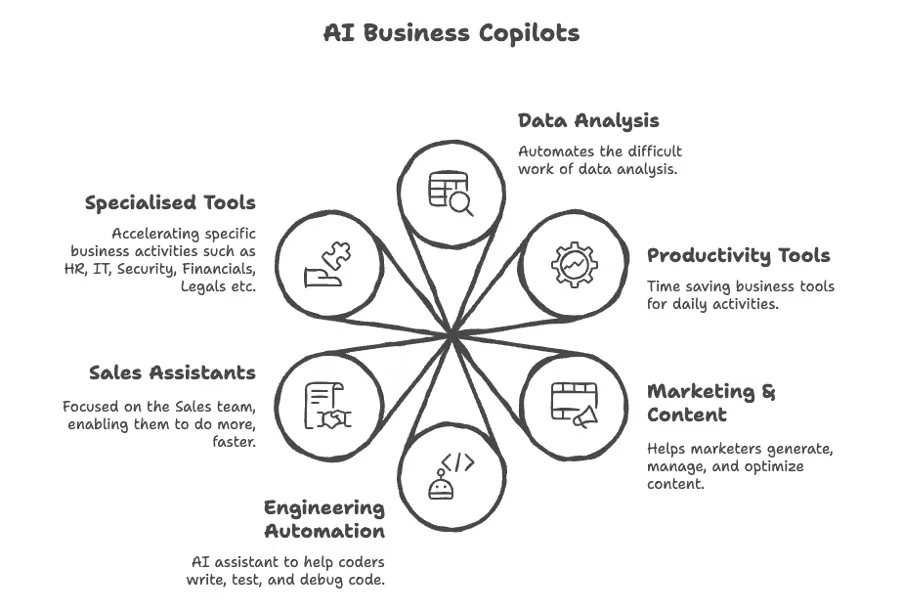
Some categories of AI Copilots for Business
There’s no one-size-fits-all answer for which AI Copilots a business needs and which are the best fit for your specific business. The best approach depends on the company’s size, data maturity, and goals. Broadly speaking, we can divide AI copilots into five useful categories as shown in the figure above. This is not a comprehensive list, and other Copilots cover different areas.
Please note these are examples and not recommendations for your business. And we are developing and deploying some of these co-pilots today. These are just representative examples. other similar product could be better for your situation.
1. Data Analyst Copilots
These are data analysis co-pilots that help business and data teams get insights from their data — quickly and efficiently.
Data-Hat AI has pioneered the sophisticated Analyst AI Agents — this is a suite of agents that acts as a copilot for the Data or Business Analyst that does the time-consuming work of data quality analysis, visualisation and generating insights quickly and accurately so that the human analyst can run multiple scenarios quickly.
These copilots make everything easy — the data, the visualisation, the insights and even the use cases themselves are automated — but it is all done with the human participating in every step. This is critical — human intelligence enables real “reasoning” for instance, but the AI copilot is able to process a lot of the data all at one.

Data-Hat’s Analyst AI Agent — deep chat, visuals and conversational avatars
Complete with audio, video multi-modal input and output, it’s as close as it gets to being a Jarvis for the Data-Analyst (reference: the movie Iron Man).
These data analysis copilots are getting to the point that business users can use them directly without knowing anything about data analysis — simple business questions can be converted into answers that are based on hundreds of tables of data that the business has access to, and to be done safely without risking off-the-shelf LLMs and having to build scripts and write the code themselves.
Examples:
- Data-Hat AI Agent (Analyst copilot) http://www.data-hat.com/
2. Vibe Coding (Developer) copilots
Code copilots help developers and data teams code faster, identify bugs, and even generate test cases. They’re transforming how software is built. Typically used by engineering teams, these are used for doing repetitive or complex coding tasks.
And if used by people with less experience, these can generate non-maintainable code, that has unnecessary extras, is verbose, and may have security vulnerabilities.
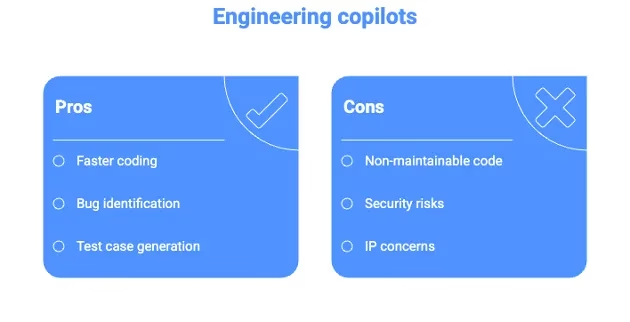
Pros and Cons of Developer Co-pilots
But if the business involves sensitive IP or proprietary algorithms, it’s a good idea to check before you use these copilots. It’s important to always secure our source code and not provide it to an LLM unless we are ok for it to be made public domain.
AI cannot replace a programmer — for the best quality code that understands the real requirements and does them efficiently, a human programmer is needed, who can use the AI to accelerate their own efforts.
Examples:
- GitHub Copilot (Developer copilot) https://github.com/features/copilot
- Claude Code (Dev copilot) https://www.claude.com/product/claude-code
2. Productivity Copilots Automating Everyday Work
These copilots help employees save time across the board — writing, summarizing, scheduling, or generating content. We use them if teams spend hours each week on repetitive admin work — writing meeting notes, drafting reports, summarizing Slack or Teams threads. I don’t recommend using them if tasks are deeply creative or require strong judgment, AI will produce generic answers without context.
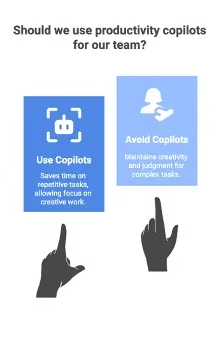
To use or not to use Productivity Copilots
AI “reasoning” is not the same as human reasoning; it is better to be forewarned. Human reasoning is the result of memories, decisions and experience with real intelligence behind it. AI reasoning is a decision taken by the information with the LLM and depends on the LLM being used, the data it was trained on and many other factors controlled by the developers.
Examples:
- Microsoft 365 Copilot (Office productivity) https://www.microsoft.com/en-us/microsoft-365-copilot
- Google Workspace Premium (Gemini) AI https://workspace.google.com/intl/en_ca/solutions/ai/
- Notion AI (note-taking and knowledge management) https://www.notion.com/product/ai
3. Marketing and Content Copilots for Scaling Brand Communication
Marketing copilots can write blog posts, generate social media content, and even optimize ads while staying true to our tone of voice. We use them when we want to scale content output or personalize campaigns across multiple segments. But these are not intelligent in the human sense — our brand voice is unique and sometimes is highly regulated (like in pharma or finance). Always keep human review in the loop.
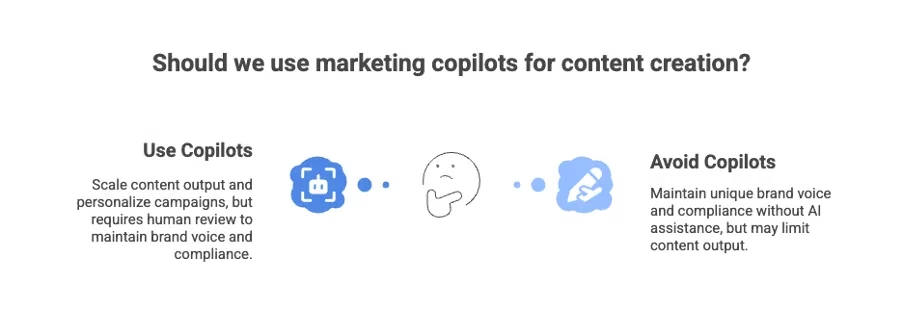
Deciding to use or not to use AI for content creation
AI cannot create our authentic voice. Humans must create that voice. Therefore, regardless of whether an AI copilot is used, it is critical to continue to create the human voice for authenticity and to stand out with your intended brand.
Get Kshitij (KK) Kumar: Data-Hat AI’s stories in your inbox
Join Medium for free to get updates from this writer.
Examples:
- Jasper AI (brand content generation)
- Napkin AI (the figures in this article are creating using Napkin AI)
- Canva Magic Studio (AI for design and visuals)
4. Sales and CRM Copilots — Smarter, Faster Selling
Sales copilots can analyze past deals, suggest next steps, and even write and deliver sequences that send follow-up messages for our reps. We use them when we want to reduce admin time for our sales teams and increase deal velocity. They are also good for reducing wasted effort in low value deal management work.
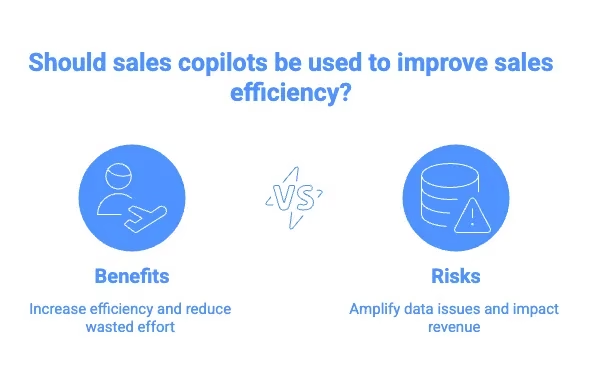
Benefits vs. Risks of using Sales Copilots
However, this can result in problems if the data hygiene is poor, AI copilots amplify both the good and the bad in the data and this can result in impacts on the revenue for the company.
Morover, sales is a very human effort. Unless the sale is very transactional, the potential buyer usually has to trust the seller, there are very human emotions involved — and these are sometimes not left to AI to solve.
Examples:
- Salesforce Einstein Copilot
- Apollo AI or LinkedIn Sales Navigator AI
- Gong AI (sales call insights and summaries)
5. Functional Copilots — Specialized AI for Core Business Functions
Beyond general productivity, we’re now seeing copilots tailored to specific business domains. These include — in HR, for instance — not just applicant tracking systems but screening, interviews and engagement surveys, forecast trends, customer service and event tracking or bug tracking. When the function already has strong data pipelines and clearly defined workflows, these copilots can help. But these can lead to premature adoption if the data is scattered or inconsistent, as discussed before, AI copilots thrive on clean, connected data and tend to give misleading outcomes if the data is not clean.
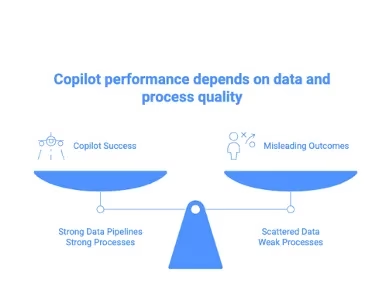
Data and Process are central to the performance of AI Copilots
Good AI copilots depend on good processes and good data. If these are non existent, these need to be fixed first. Once again, the human factor is critical — the AI copilot can help prepare but not replace the human. Processes need to be created by the humans, tested in real life and then Copilots can help. Standard processes may be automated using Copilots.
Examples:
- HR copilots (like Workday AI) that automate candidate screening, employee engagement surveys, and policy queries.
- Finance copilots that generate variance analysis and forecast trends from ERP data.
- Customer service copilots (like ServiceNow AI) that handle Tier 1 tickets and escalate complex issues.
How to Choose the Right Copilots
Before deploying an AI copilot — it’s best to pause and ask three questions:
- What problem are we trying to solve?
Start with pain points — time lost, inefficiency, errors, or missed insights, revenue or sales loss, etc. - Do we have the data and the data foundation for the use case?
AI copilots need structured, reliable data. Garbage data in, garbage results out. If we don’t have the data or we don’t have a way to collect and use it, we will struggle to deploy and benefit from the AI. - Will it integrate with our current systems?
Existing workflows with email, CRM, ERP, HRIS, etc. must work with the copilot.
Copilots are relatively dumb extensions of the workforce. The intelligence in AI is not the same as intelligence in humans — which is why human intelligence is needed to ensure good results with the copilots.
The Emerging Trend: Teams of Humans and Agents
Some forward-looking companies are already experimenting with hybrid teams which see a few humans working alongside dozens of AI copilots. In these cases, the AI copilots are really focused on specific problem areas, learn from it, and support the human with answers built on their data.
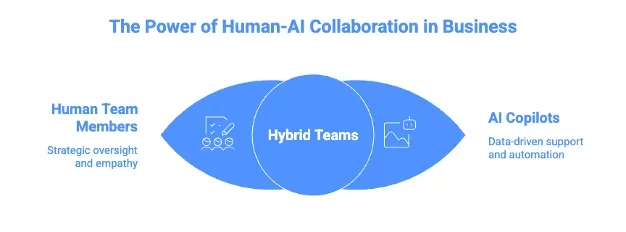
Human-AI collaboration
For example:
- A retail company might use one human merchandiser supported by AI copilots or agents for pricing, demand forecasting, and product description generation.
- A consulting firm might use copilots for proposal generation, data analysis, and slide creation, freeing humans for strategy and client engagement.
This trend is pushing HR to rethink itself where it’s not just managing human resources, but also AI resources. These AI teammates need different governance, versioning, and even ethical oversight, and each of these tasks need to be tested before deployment.
Start Small, Scale Smart
AI copilots can create enormous value if deployed thoughtfully.
We recommend starting with high-impact, low-risk use cases like productivity and marketing. Build experience. Strengthen your data foundation. Then expand into specialized copilots for engineering, sales, or HR.
AI copilots don’t replace human intelligence. They amplify human intelligence.
Therefore, the real advantage comes when humans and AI work together, each doing what they do best.
Feedback welcome — share, comment and if you need more information, please email [email protected] and I will try to answer your questions.